

American Family Insurance
Test
Project Summary
Designed a
The Goal
Drive growth and profitability by making the policy and quoting process faster and easier for Agents.

Timeline
9 months
Collaboration
CFR (Commercial, Farm, Ranch) division Vice Presidents (3)
CFR Business Stakeholders
(5)
Product Manager
Product Owner
Developers (2)
Risk Data Analyst
Underwriters (2)
Agents (2)
Tools
Figma
Axure
Miro
Zoom
Usertesting.com
Jira
Confluence
My Role
UX Lead
Research Lead

Outcome and Impact
The final experience created a more pleasant and satisfying policy writing/quoting experience which
- Made task completion faster and feel easier.
- Empowered Agents by giving them more choices.
- Allowed Agents to complete 2.1 more quotes per day, increasing growth and profitability

Business Hypothesis
After several meetings about how to achieve their goal, vice presidents, stakeholders, and business leads believed that using highly accurate API-sourced data to automatically populate fields in the legacy system would make the policy writing and quoting process faster and easier.
They assumed agents would accept the data as provided, which would reduce the time spent filling out forms.
Getting To Know Our Agents
After spending time virtually shadowing support staff agents as they complete the task of filling property data into forms, and a previous user research by another project team, I learned many things about our agents which indicated that the conclusion the business came to wouldn't work well for our agents.

Key Persona: The Support Staff Agent

Startling Discoveries
I created personas for each of our agent types after shadowing and interviewing them. We focused on the support staff agent, the agent that does the majority of data entry for quoting.
The most staggering finding was that of the 40-60 pieces of data agents were responsible for locating and entering, each data point was double, and often triple checked for its accuracy. A variety of external, third party sources were used to verify the data.
Agents felt the need to make sure the data about the property was correct and up to date to avoid time spent on task down the line, and confrontations with sales agents, customers, and underwriters.

Agent Challenges

Design Focus
Disempowered

Agents don't like to be told they must use data they don't trust that doesn't always reflect real-world conditions.
Give agents the options to Enable agents to review, modify, and validate system-provided data.
Undervalued
Agents who entered policy data felt disrespected because their work was treated as less important than the work of sales agents, customers, and underwriters.
Position automation as an aid to expert decision-making, not a substitute for agent expertise and authority.
Strained
Data inaccuracies in the workflow frequently triggered
escalations and negative feedback directed at agents from sales agents, customers, and underwriters.
Make it easy for agents to validate, correct, and trust the data they submit.
Time-limited
Agents are limited in the number of quotes they can process each day due to time spent repeatedly validating and sourcing required data.
Reduce overall time on task without compromising agents’ need to thoroughly validate data.
Beyond The Original Hypothesis
Knowing what we now knew about our users, focusing solely on automatically populating form fields with API data in an effort to accelerate data entry would not meet most of our users’ unique needs, mindsets, and goals.
- Agents say the API data they have been presented with in the past did not possess a high degree of accuracy.
- Even if it did, agents insisted they would verify all prefill data given to them with a third party source. They will not blindly accept what is prefilled.

Much More Than Just Accelerating Data Entry
The original business hypothesis was flawed, but the goal of reducing time on task needed to be met. I wanted to achieve this goal without sacrificing our agents' needs and task completion method preferences.
Initial drafts began with these challenges in mind.
Before - Prefill
The VPs and stakeholders mocked up how they thought the fields on the page should look, with the data prefilled into the form fields. The following points were noted.
- Agents would have to delete the information in the field and type the correct data into the field if the prefilled data was incorrect, which took time.
- The source of the data was a mystery.
- The asterisk next to every form field was redundant, adding visual clutter to the form.

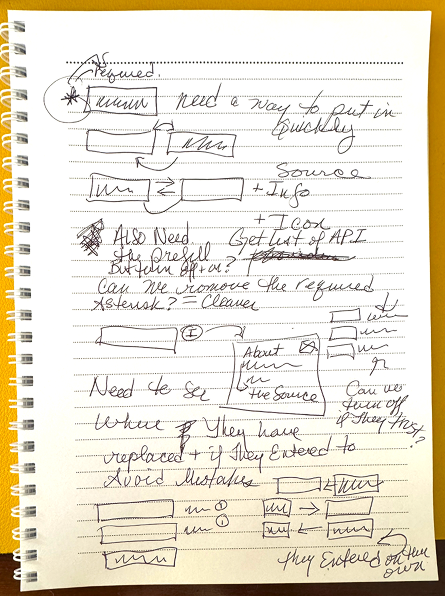
After - Suggested Prefill
The new design solves some issues with they business proposal.
- Enabling agents to simply click an icon to fill the API data into the field means they would not have to take time deleting incorrect data and typing in correct data. This is also preferable to not having any API data available, as they would otherwise have to manually enter text into every field.
- The data source is listed next to each field. The agent can view more information about the source by clicking on the text link.
- The asterisks were removed next to every form field and replaced with a text message above the form.

The suggested prefill design corrects issues that automatic prefill design does not.

Agents can learn more about the source of the API data.
Reasons Automatic Prefilling of API Data was not successful
Heuristic Review of Automatic Prefill
The Power Of Choice
In the real world, If we see someone we think may need help, the polite thing to do is offer your assistance and then listen to their answer before automatically jumping in and helping the person, who may not always want or need the help you wish to give.
A suggested prefill asks users for permission to help them. Automatic prefill, assumes control before asking users how they want to work.
The suggested prefill approach increased agents’ sense of autonomy and worth.They reported feeling the company valued their expertise and judgment, treating them as active, knowledgeable contributors.
Agents reported that automatic prefill made them feel as if anyone—or even a machine—could do their job, which leaves them feeling undervalued.

Suggested prefill politely asks permission

Automatic prefill rudely assumes control

- An real agent quote during our user test.
Heuristic Review of Automatic Prefill
Reduced Agent Frustration
Agents reported that a suggested prefill option left them feeling they had to live with incorrect data and accept the consequences. Automatic prefill empowered them to accept or fix API data errors.
Repeatedly fixing a mistake you didn't make takes a psychological toll. It’s less frustrating to correct your own errors than someone else’s, and these types of small annoyances compound over time.
This buildup often leads to corner-cutting, which compromises long-term data quality rather than saving time.

Correcting mistakes you made yourself.

Repeatedly correcting someone else’s mistakes

Begin User Testing
Participants
•6 Agents From across the US, spanning 3 time zones, in Zoom sessions (one-on-one) with an interactive prototype
•Asked for the agent in the office who spends the the majority of their time entering data into Policy Center*
Research topics
22 questions total (determined by Kyle and teammates)
•Risk Score Model Graphic (SingleSource)
•Generate Replacement Cost Graphic (SingleSource)
•Compare suggested prefill and automatic prefill patterns (Interactive Prototype)
Test Method
Qualitative (observation & Interview)
•Quick way to learn users’ perceptions, thoughts, and feelings
•Results are qualitative, not quantitative
Prefill Concept Testing
The test would inform how API-sourced data should be introduced into the policy system interface.
The initial belief was that showing trusted sources and descriptions for data automatically prefilled into form fields would lead agents to accept the data without further verification.
Agents emphasized that avoiding incorrect or out of date information in the data fields was their most important concern to prevent issues and criticism from both underwriters and customers. Agents verify each piece of data 2-3 times before entering it into a form field!


Methods and Participants
I conducted one-on-one sessions with insurance agents from different regions. Participants were selected based on their primary responsibility for entering data into the policy system.
The study was qualitative, relying on observational and interview data. Agemts interacted with both automatic and suggested prefill interfaces using realistic scenarios and were asked to provide feedback on usability, data trust, and preference.
Apply All Suggestions and Show Sources
An Apply all suggestions checkbox was added to the suggested prefill screens for aents who might want to quickly and easily apply all the data to the fields like the automatic prefill concept of the original hypothesis. It put Agents one more option to control how they entered the data.
As show sources checkbox was added to reduce screen clutter if agents found these sources unhelpful.


Key Findings
80% of the participants preferred the suggested prefill approach.
The remaining participants said they liked both approaches.
Participants reported that suggested prefill reduces unnecessary rework of erasing and retype incorrect data, offers flexibility when applying data, supports their workflows by promoting verification rather than blind trust, and improves information retention and accuracy.
While some appreciated the implied efficiency of automatic prefill, they ultimately prioritized accuracy and control.
Participants stated that they did not trust the accuracy or currency of the prefilled data source even from reliable known sources, and will continue verifying data with third-party tools, disproving the original hypothesis that providing data sources will increase trust.
Improved Data Quality
Participants did not inherently trust prefilled data—even when labeled with known sources—and reported they would continue verifying data with third-party tools regardless of the system’s claims.
Suggested prefill helps agents catch errors more effectively. While reviewing data, agents may occasionally overlook fields. Automatic prefill makes it harder to tell which data has been corrected, skipped, or left unchanged, often resulting in unnoticed errors because skipped fields fail to trigger error messages. Suggested prefill uses visual cues to prompt agents to engage with each data point, making mistakes easier to spot and correct.

“Did I accept these values? Did I change them? Did I accidentally skip this field?”

“I accepted and applied the assessment value but changed the market value. I know because the assessment value suggestion is empty. The market value field has a suggestion next to it, but there is different data in the field, so I know I corrected that data.”
Strained -
Solved
Reduced Agent Frustration
With suggested prefill, agents feel empowered to ignore incorrect suggestions, whereas automatic prefill forces them to fix system errors by deleting the wrong value and entering the correct one.
Repeatedly fixing mistakes they didn’t cause takes a psychological toll. It’s less frustrating to correct your own errors than someone else’s, and small annoyances compound over time. This buildup often leads to corner-cutting, which compromises long-term data quality rather than saving time.

80% of participants preferred the suggested prefill model for entering data into Policy Center.
Conclusion
Based on user feedback, the automatic prefill method failed to align with agents’ real-world responsibilities and risk aversion. Efficiency alone won’t drive adoption or trust.The design did not acknowledge their risk sensitivity need for accuracy, and their desire for autonomy.
The suggested prefill model respects these needs and offers a scalable, user-centered approach that enhances satisfaction and business outcomes while reducing cognitive friction, providing better error detection, and aligning more closely with agents’ established workflows and psychological needs. It respects the agent’s role as a data expert rather than a passive error-corrector
While automatic prefill may have theoretically sped up task completion, the suggested prefill model delivers a more satisfying experience and encouraged greater willingness to write more policies—supporting the original profitability goal through user satisfaction rather than speed alone.